Hopscotch Hashing
A localized open addressing scheme designed to improve cache locality and support high concurrency.
Hashing Fundamentals
In the baseline solution, the hash table is implemented using C++/STL's std::unordered_map.
Hashing is a technique that maps data to a fixed-size array using a hash function. This function takes an input (key) and returns an index in the hash table where the corresponding value is stored. This makes searching and accessing elements extremely efficient.
The core challenge is Collision Handling: managing scenarios where multiple keys hash to the same index. Hopscotch hashing optimizes this by exploiting spatial locality.
The Concept
Unlike Cuckoo hashing which moves items far away, Hopscotch keeps items in a small "neighborhood" near their original hash.
The Hopscotch Algorithm
The Hopscotch Hashing algorithm [2] uses a single array of buckets. For each bucket, its neighborhood consists of a small number of \( H \) consecutive buckets (i.e., those with indices close to the original hashed position).
The desired property of the neighborhood is that the cost of finding an element within these \( H \) positions is comparable to finding it in the original position (since they likely reside in the same cache line). The neighborhood size \( H \) must be sufficient to allow search complexity of \( O(\log N) \) in the worst case, but \( O(1) \) on average.
If a neighborhood becomes full, the table must be resized (rehash).
Lookup & Bitmaps
In Hopscotch hashing, an item will always be inserted and found within the neighborhood of the position derived from the hash function. In other words, it is either at the original hash value position or one of the subsequent \( H-1 \) neighbors.
To accelerate searching, each bucket includes a hop-information bitmap. This bitmap indicates which of the next \( H \) positions contain items that originally hashed to the current bucket.
This allows an item to be found quickly by checking only the specific positions indicated by the bitmap and ignoring the rest.
Insertion Algorithm
If the hop-information bitmap shows that all \( H \) positions in the neighborhood of hash \( i \) are full with items belonging to \( i \), resize the table.
Starting from position \( i \), use linear probing to find the closest empty bucket \( j \). If none exists, resize.
While \( (j - i) \ge H \), move the empty slot \( j \) closer to \( i \):
- Search buckets \( k \) preceding \( j \) (where \( H > j - k \)) for an item \( y \) whose hash value allows it to move to \( j \).
- Use bitmaps to speed up this search.
- If no such item \( y \) exists, resize table.
- Move \( y \) to \( j \), making \( k \) the new empty slot. Repeat.
Store the item in the final empty slot \( j \) (which is now within the neighborhood) and update the bitmap at \( i \).
Visual Example
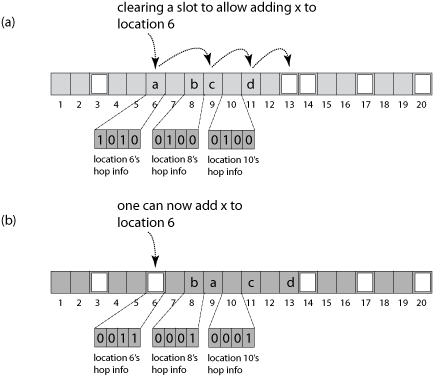
Source: Wikipedia (CC BY 3.0)
In the example shown, \( H=4 \). Grey buckets are occupied.
Part (a): An item with hash value 6 is added. Linear search finds that bucket 13 is the nearest empty slot.
Since bucket 13 is more than 4 positions away from 6, the algorithm searches for a closer bucket to swap with 13. It checks bucket 10 (distance \( H-1=3 \)). The bitmap at 10 indicates that the item currently at 11 can be moved to 13.
After moving item 'd', the empty slot is now at 11. This is still too far from 6. The algorithm checks bucket 8. Its bitmap shows the item at 9 can move to 11.
Part (b): With bucket 9 now empty (which is within distance 4 of bucket 6), the new item 'a' can be successfully inserted.
Visualization
Visualization of the Hopscotch hashing algorithm showing neighborhood management.